
Gantt chart template for Excel that reschedules itself as dates change.
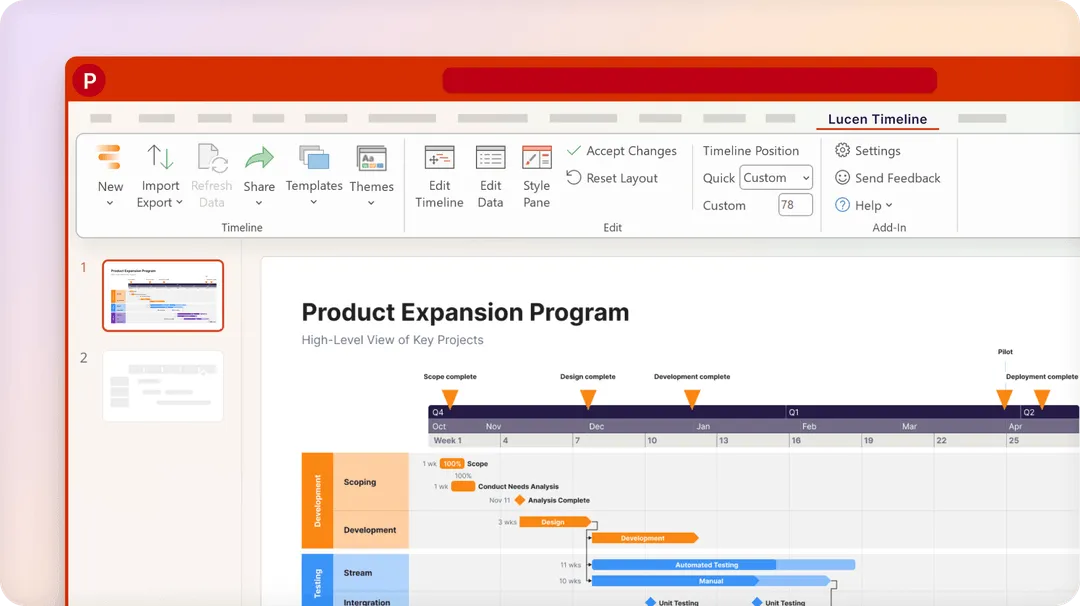
View details →Lucen, formerly Office Timeline, is a Microsoft-native project visualization tool for turning project schedules and planning data into polished timelines, Gantt charts, roadmaps, and presentation-ready visuals.
What sets Lucen apart is how quickly detailed project information can be transformed into a professional visual result. Instead of spending significant time formatting a timeline manually, users can build clear, structured visuals with features such as dependencies, swimlanes, milestones, and a highly customizable timeband. The timeband in particular gives Lucen a distinctive visual character, allowing the timeline scale and presentation to be adapted to the needs of each project.
Lucen also provides themes and templates that make visual customization fast and consistent. They are useful when you need to create an impressive project visual quickly, but they can also support teams that work with a more rigorous, predefined visual style and need consistent results across recurring project reports and presentations.
The result is a tool that sits between project planning and project communication: it helps transform detailed project data into a visual story that stakeholders can understand quickly. It is particularly relevant for project managers, PMOs, consultants, and teams that rely on professional project presentations and need to communicate schedules, milestones, dependencies, and progress clearly.
For time tracking, the same company offers Lucen Track, a separate product with its own plans.
At a glance
Who's it for?
Project managers, PMOs, consultants, and teams that regularly communicate project plans and status through Microsoft PowerPoint.
Strength
A Microsoft-native workflow for turning existing project data into polished, presentation-ready timelines and Gantt charts.
Trade-off
Lucen Timeline is primarily a visualization and communication layer rather than a complete project management system. It isn't intended to replace day-to-day task management, collaboration, or issue tracking — teams that need that will typically use Lucen alongside another system. Its strongest use case is the gap between project data and stakeholder communication.
When to choose it
Choose Lucen when your project plans already live in Excel, Jira, Microsoft Project, or Smartsheet, PowerPoint is an important part of your reporting process, and you regularly create project status presentations or need clear timelines, milestones, dependencies, or roadmaps for stakeholders. If you need a single platform for planning, assigning, and managing project work from start to finish, Lucen is better viewed as a complementary visualization tool.
Lucen Timeline pricing
Free
$0
1-year free license, renewed annually
- Simple timelines for PowerPoint
- Up to 10 milestones or tasks per slide
Lite
$9 per user / month
1-year license billed annually
- More templates
- Styling control for repeatable reporting
Plus
$17 per user / month
1-year license billed annually
- Swimlanes
- Dependencies
- Excel import
Expert
$21 per user / month
1-year license billed annually
- Planned vs. actual tracking
- Jira and Wrike import
- Advanced templates
Prices in USD, checked October 2026. Prices exclude VAT and local taxes unless stated, and may vary by region, team size, and billing period. Vendors change plans often. See current Lucen Timeline pricing →
Why teams choose it
- PowerPoint-native workflow
Create and update project timelines directly in an environment many teams already use for presentations.
- Works with existing project data
Connect project information from Excel, Microsoft Project, Jira, Smartsheet, and other sources.
- Presentation-ready visuals
Create timelines, Gantt charts, milestones, swimlanes, and other visuals designed for stakeholder communication.
- Less manual updating
Keep visual project presentations connected to their underlying project data instead of rebuilding them manually.
- Microsoft-focused
Fits into existing Microsoft workflows without requiring teams to move their project data to another platform.
Compare Lucen Timeline
FAQ
Is Lucen a project management tool?
Lucen Timeline is primarily focused on project visualization and communication rather than full project management. It works alongside the systems teams already use to plan and manage their projects.
What happened to Office Timeline?
Office Timeline has been rebranded as Lucen Timeline as part of the broader Lucen Software platform.
Does Lucen work with PowerPoint?
Yes. Lucen Timeline is a PowerPoint add-in, designed to create and update timelines and Gantt charts directly inside PowerPoint.
Can Lucen import project data?
Yes. Lucen supports workflows involving Excel, Microsoft Project, Jira, Smartsheet, and other project-data sources.
Does Lucen have a free version?
Yes. Lucen Timeline offers a Free plan, alongside paid plans with additional functionality.
What can I create with Lucen Timeline?
Lucen Timeline can be used to create project timelines, Gantt charts, milestones, swimlanes, roadmaps, and other visual project schedules.
Resources
- Lucen Blog →
Practical articles and guides covering project management, timelines, Gantt charts, productivity, and visual project communication.