
Gantt chart template for Excel that reschedules itself as dates change.
View details →GanttPRO is a project planning and scheduling platform built around interactive Gantt charts. It combines dependency-based scheduling with features such as auto-scheduling, critical path analysis, baselines, project calendars, and multiple planning views. When tasks or dependencies change, the schedule can be recalculated automatically, helping project managers keep timelines aligned as work evolves.
Beyond scheduling, GanttPRO includes resource and workload management, allowing teams to monitor resource allocation and adjust assignments as project requirements change. Projects can also be viewed through Gantt, Board, List, Calendar, Dashboard, and Workload views, while integrations with tools such as Slack, Microsoft Teams, Google Drive, OneDrive, Outlook Calendar, and Jira Cloud connect project planning with the rest of the team's workflow.
GanttPRO is particularly suited to project managers who need to build, maintain, and adjust real project schedules, rather than simply create a visual Gantt chart for reporting or presentation. Its main focus is the combination of interactive scheduling, task dependencies, critical-path analysis, and resource planning in one environment.
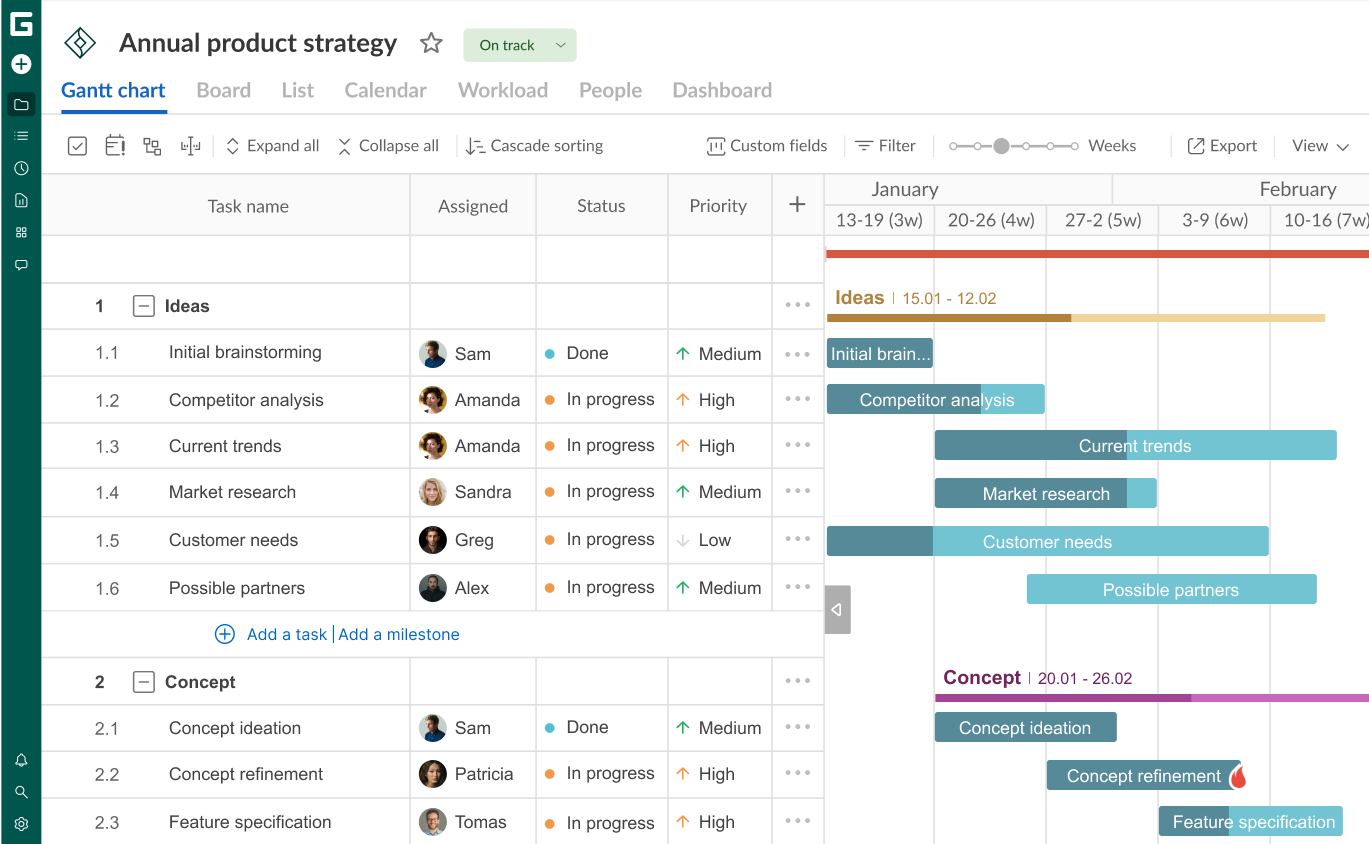
At a glance
Who's it for?
GanttPRO suits project managers and teams that need to actively plan and adjust projects with dependencies, deadlines, resources, and changing schedules. It is particularly relevant when the Gantt chart is part of the planning process rather than just a way to present project information.
Strength
Scheduling depth. GanttPRO combines dependencies, auto-scheduling, critical path analysis, baselines, project calendars, and workload management in the same environment.
Trade-off
GanttPRO goes deeper into project scheduling than simple timeline or Gantt visualization tools. That makes it more useful for active project planning, but it also means there is more to learn than with a tool designed primarily for creating simple timelines.
When to choose it
Choose GanttPRO when you need a live project schedule that can respond to changes in task relationships, dates, resources, and workload — rather than a static or presentation-oriented Gantt chart.
GanttPRO pricing
Core
$7 per user / month
Billed annually, for a 20-member team
- Gantt charts
- Project calendar
- Auto scheduling
- Virtual resources
Advanced
$10 per user / month
Billed annually, for a 20-member team
- Overdue tasks
- Custom fields and filters
- Custom project templates
Business
$17 per user / month
Billed annually, for a 20-member team
- Workload and portfolio management
- Budget planning
- Time tracking
Enterprise
$20 per user / month
Billed annually, limited-time offer (regular price $30)
- SAML SSO
- Custom roles and rights
- Product training
- Resource conversion
Prices in USD, checked October 2026. Prices exclude VAT and local taxes unless stated, and may vary by region, team size, and billing period. Vendors change plans often. See current GanttPRO pricing →
Why teams choose it
- Scheduling that adapts to change
GanttPRO treats the Gantt chart as an active planning tool rather than a static timeline. Dependencies, auto-scheduling, milestones, deadlines, and project calendars work together so that changes to one part of the plan can be reflected in related tasks.
- Resource planning alongside the schedule
Teams can assign work to people and resources and monitor workload directly alongside the project timeline. This makes it easier to spot overloaded resources and adjust assignments before they affect the schedule.
- Multiple views from the same project data
GanttPRO provides Gantt, Board, List, Calendar, Workload, Dashboard, and Portfolio views. Teams can therefore move between detailed scheduling, task management, workload planning, and higher-level project monitoring without maintaining separate versions of the project.
- More control over project timelines
Baselines, critical path analysis, float, deadlines, and progress tracking provide additional visibility into how the current plan compares with the intended schedule and where potential delays may occur.
- Connects planning with the wider workflow
GanttPRO integrates with tools such as Slack, Microsoft Teams, Google Drive, OneDrive, Outlook Calendar, and Jira Cloud. This can help teams keep project planning connected to the communication and productivity tools they already use.
Compare GanttPRO
See how GanttPRO compares with other project management and Gantt chart tools across scheduling, dependencies, resource management, collaboration, and reporting.
FAQ
Is GanttPRO free to use?
GanttPRO does not have a permanent free plan. It offers a free trial, after which continued use requires a paid plan. The current plans include Core, Advanced, Business, and Enterprise options with different planning, resource-management, collaboration, and reporting capabilities.
Does GanttPRO have desktop or mobile apps?
GanttPRO is primarily a web-based application and also provides a mobile app. The mobile version supports activities such as creating tasks, receiving notifications, and responding to comments.
What integrations does GanttPRO support?
GanttPRO supports integrations with Slack, Microsoft Teams, Google Drive, OneDrive, Google Calendar, Outlook Calendar, and Jira Cloud. An API is also available for connecting GanttPRO with other systems. Some integrations and API capabilities depend on the plan.
Is GanttPRO cloud-based or self-hosted?
GanttPRO is a cloud-based SaaS application. It is designed to be accessed online rather than installed as a self-hosted project management system.
What team sizes is GanttPRO built for?
GanttPRO supports individual users as well as small, mid-size, and larger organizations. Its plans range from core project planning to advanced resource, portfolio, reporting, security, and enterprise capabilities.
Does GanttPRO support critical path analysis?
Yes. GanttPRO can automatically identify the sequence of tasks that directly affects the project's completion date. It also provides float information to help identify how much flexibility individual tasks have.
Does GanttPRO automatically reschedule tasks?
Yes. Its auto-scheduling feature recalculates task schedules when dates or dependencies change. Auto-scheduling can also be disabled when manual scheduling is preferred.
Can GanttPRO manage resources and workload?
Yes. GanttPRO supports team members, virtual resources, personal calendars, workload management, and different resource types. Depending on the plan, it can also support budget tracking and time tracking.
Can I import an existing project into GanttPRO?
Yes. GanttPRO supports importing projects from formats including Excel and Microsoft Project, as well as Jira Cloud integration.
Can I share a GanttPRO project with stakeholders?
Yes. Projects can be shared with stakeholders through static or dynamic links, allowing people outside the core project team to view project information without necessarily becoming full project members.
Learn more about GanttPRO
Want to explore project planning, scheduling, and Gantt charts in more detail?
Visit the GanttPRO Project Management Blog for practical guides, project management tips, product tutorials, and the latest GanttPRO updates.
Explore the GanttPRO Blog →