September 10, 2026
Still Using Excel for Project Management?
Excel isn't necessarily the problem. Knowing when you've outgrown it is.
If your task list, budget, and timeline all live in the same workbook, you're not doing anything unusual. Millions of people still manage projects this way — and for many situations, Excel remains a perfectly practical choice.
It is familiar, flexible, inexpensive, and already available to most teams. You can structure a project exactly the way you want, build formulas around your workflow, and adapt the spreadsheet as the project changes.
For a one-person project, a short-lived plan, or a simple budget tracker, that flexibility can be difficult for a dedicated project management tool to beat.
Excel can take you surprisingly far. The question is what happens when your project starts asking for more.
Where a spreadsheet holds up well
Spreadsheets tend to keep working when the project stays small and mostly in one person's hands.
Think about a freelancer tracking hours and invoices, a small task list for a project that will wrap up in a few weeks, or a budget that needs formulas more than it needs notifications.
If you're the only person editing the file, or your team shares it through OneDrive or Google Sheets without getting in each other's way, there may be no strong reason to switch.
Excel is particularly useful when you need flexibility more than structure. You can add a column, create a formula, change the layout, or build a quick report without waiting for a software configuration or learning a new system.
For straightforward projects, that can be enough.
Where it starts to strain
The cracks usually show up when the project becomes more collaborative, more dynamic, or simply harder to keep updated.
A few familiar signs:
- File names like "plan_final_v3_ACTUALFINAL.xlsx" start appearing, and nobody is completely sure which version is current.
- Status updates depend on someone remembering to open the file and change a cell.
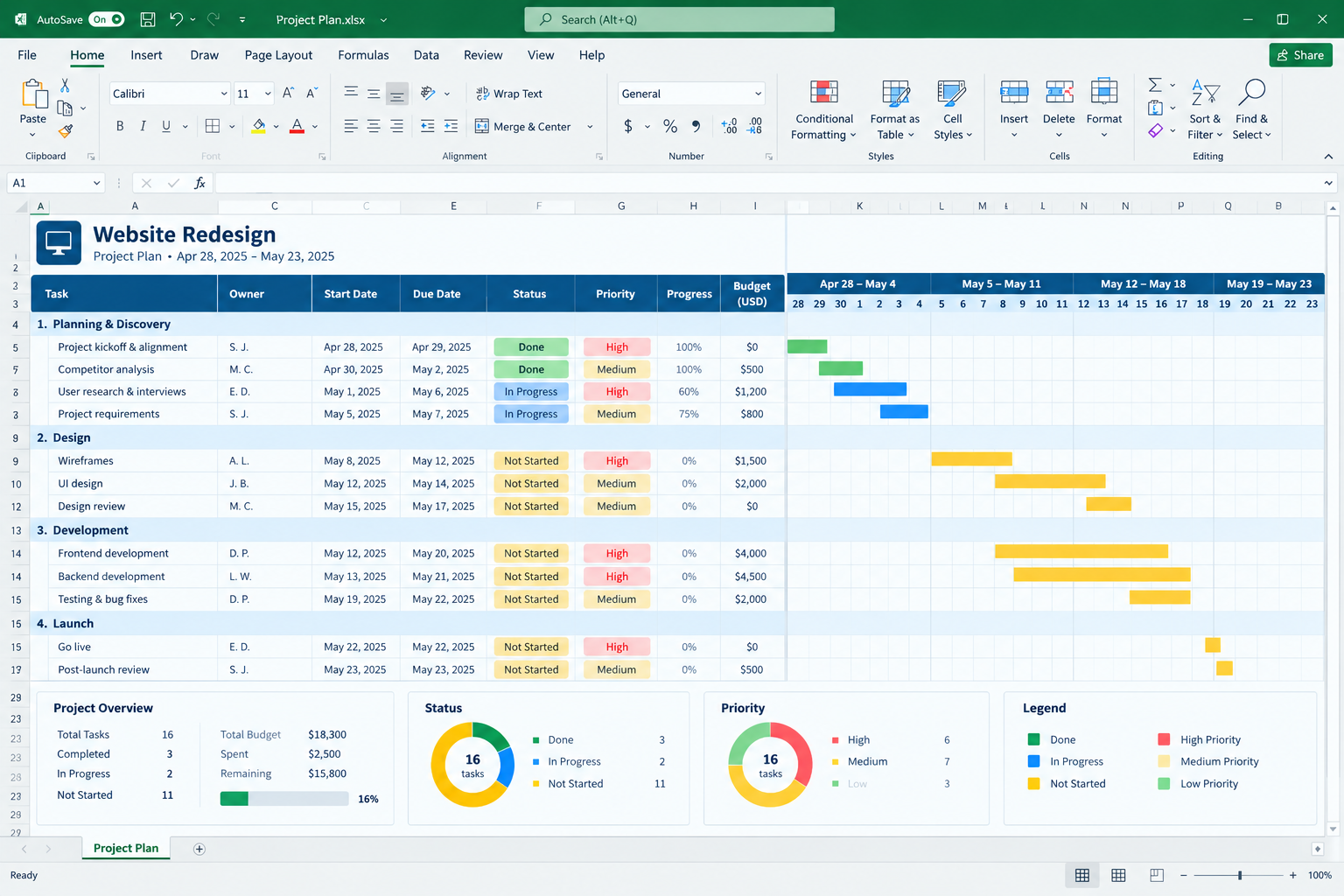
- The "timeline" is a row of colored cells that took an afternoon to build and breaks the moment a date shifts.
- Answering "What's overdue right now?" means scrolling and filtering instead of just looking at a dashboard.
- Several people need to update the same project, but ownership and changes are becoming difficult to track.
- A small change in one part of the plan means manually updating several other places.
- You start spending more time maintaining the spreadsheet than using it to manage the project.
None of this means Excel is broken.
It means the job has started to require capabilities that a spreadsheet isn't really designed to provide: shared real-time project state, automatic status tracking, dependencies, notifications, workload visibility, and purpose-built project views.
The Excel tipping point
A useful way to think about the transition isn't "Excel or project management software?"
It's:
What is becoming difficult to manage?
| If your main problem is... | You may need... |
|---|---|
| Keeping tasks organized and visible | Task management or a Kanban board |
| Managing dates and dependencies | A timeline or Gantt chart |
| Understanding who is overloaded | Resource or workload management |
| Tracking hours and billable work | Time tracking |
| Keeping people updated automatically | Notifications and collaboration |
| Understanding overall project health | Dashboards and reporting |
| Managing several projects together | Portfolio or multi-project management |
This is where choosing software becomes more useful than simply looking for the tool with the longest feature list.
You don't necessarily need a platform that does everything.
You need the capabilities that solve the problems you're actually having.
A simple way to check
If you've caught yourself rebuilding a Kanban board or a Gantt chart out of colored cells and merged rows, that's a useful signal.
So is asking "Who has the latest version?" more than once a week.
Another good test is to look at how much manual work is required to answer simple questions:
- What's overdue?
- Who is responsible for this task?
- What needs to happen next?
- Which projects are falling behind?
- Who has too much work?
- How much time have we spent?
- What changed since last week?
If answering these questions requires opening, filtering, updating, and cross-checking several parts of a spreadsheet, you may have reached the point where a dedicated tool can save more time than it costs to adopt.
Moving beyond Excel doesn't have to mean buying a huge platform
The next step doesn't necessarily need to be a complex enterprise project management system.
If your main problem is visual task tracking, a lightweight Kanban tool may be enough.
If dates, dependencies, and scheduling are the real issue, a dedicated timeline or Gantt tool may make more sense.
If hours and invoicing keep slipping through the cracks, a time-tracking tool could solve the problem without changing the rest of your workflow.
And if you're managing multiple projects with shared resources, budgets, and reporting requirements, you may need something more comprehensive.
The important part is to start with the problem, rather than the software.
So, should you stop using Excel?
Not necessarily.
If Excel still gives you a clear picture of the project, your team can keep it up to date, and you're not spending significant time maintaining the spreadsheet, there may be little reason to change.
But if the spreadsheet has gradually turned into a homemade project management system — complete with color-coded status cells, manually maintained timelines, complicated formulas, and multiple versions — it may be worth looking at what dedicated tools can do.
There is no single "best" project management tool.
The right choice depends on how your team works, how complex your projects are, and which parts of project management are actually causing friction.
If you're ready to explore alternatives, start with the problem you're trying to solve — not with a list of software features.
Browse Project Management tools or explore Timeline & Gantt tools to find tools built around the way you work.